What I worked on this week:
Animations! It’s beyond time to get the capsule primitives OUT and the character models IN.
Since leaving education and losing all of those sweet, sweet educator licenses, I can’t afford fancy tools like Maya, iClone, etc. Besides…I’m not a 3D modeling specialist OR an animator…and while I have basic skills in those areas (a must as an indie dev), I also work a full-time and part time job – I don’t have the kind of time needed to master those incredible tools!
So…what do you use?
uMotion Pro. It’s an add-on asset that lets me do my modeling right inside of my game scene! It’s more than powerful enough to handle what I need, and makes things easy enough to learn and use that I can confidently edit and customize animations.
Like practically everyone else in the industry, I use purchased / licensed packs of basic animations as starting points. I import these into uMotion, edit them to suit my characters’ needs, and save the custom animations separately. Drag them into the Unity Animator, and BAM! Animations that work for my character!
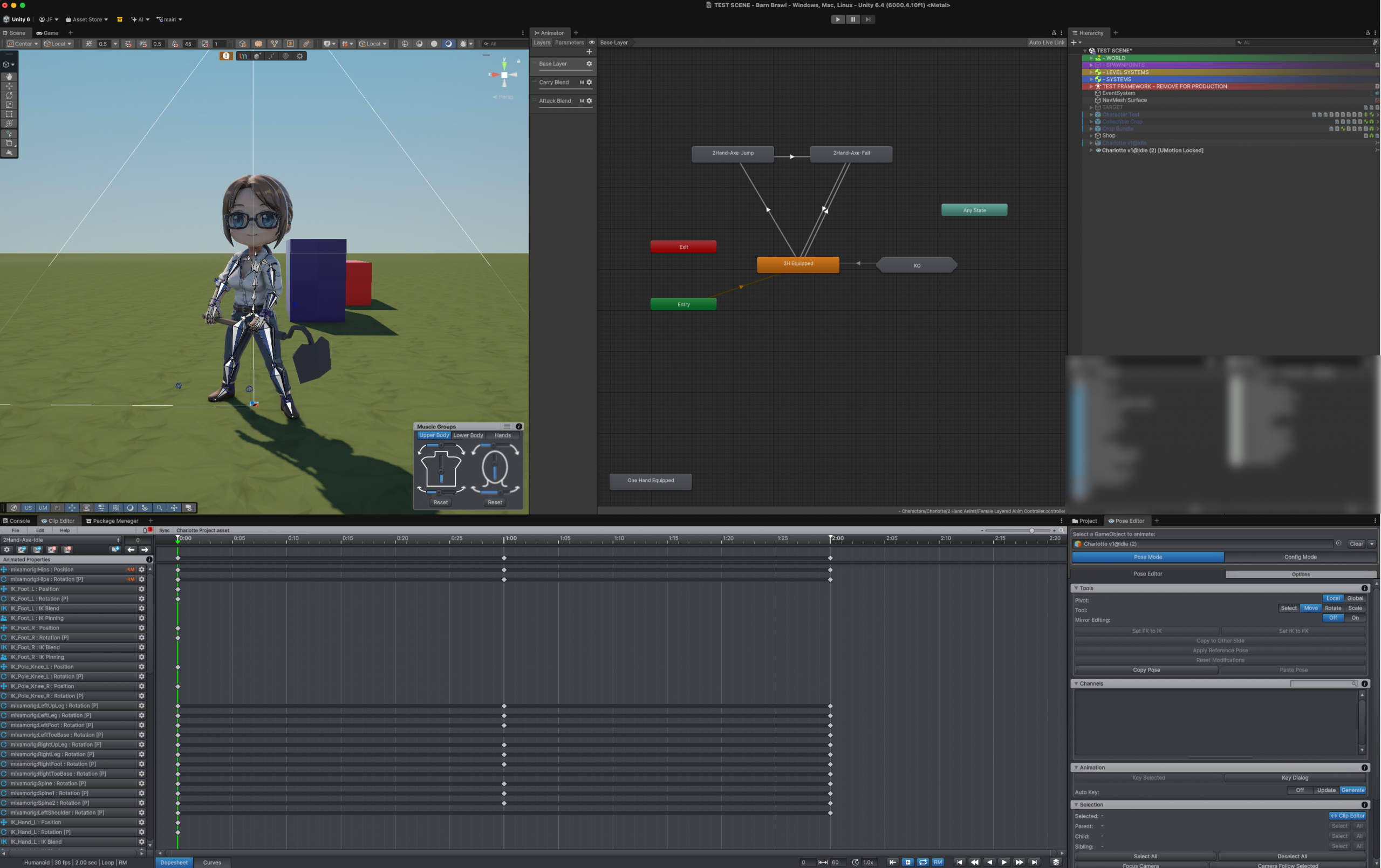
The screenshot above is a capture from animating Charlotte’s idle pose. Her primary weapon is a garden hoe, so her animations center around a two-handed (in this case, a Great Axe) template. I altered her animations and pose to match her physical design (Barn Brawl is drawn in a modified Chibi style) and her personality: Charlotte is a school teacher determined to disprove the whole “those who can’t do, teach” thing. Her animations need to reflect her desire to prove herself and her “textbook confidence.”
That’s it?? A whole week on animations?
Yes and No. I had to relearn uMotion – it’s been about 3 years since I last used the tool. I also completely goofed up the first set of animations I made – forgot to check the import / root motion settings on the source animations and ended up with Charlotte twisting like a pretzel to attack!
By Wednesday, I had re-done most of Charlotte’s animations – then Life got in the way a bit. We had a new shed delivered to hold my tools and the stuff we keep in storage. Unloading the temporary unit, moving everything, setting up the new shed, loading everything in quickly before a rain storm (that never came….grrrr) – this ate up most of my free time this week, to be honest.
I’m a little worried about the lost time, but have told Wifey and the rest of the world that I’ll be “going dark” for the next couple of weeks while I prep the demo for SEGE. That reminds me – I need to make a post about that – we got in! 🙂
Charlotte’s base animations will serve as templates for most of the other female characters in the game, so that means Jenny, Charlotte, and Scarlett will all three be ready and playable for the demo.
My Plan:
Now that I can have a character in the game, my focus now will be on integrating the other visuals in the game. Fields are the biggest – I need crops, not data tables. I’ll also need to make things in the world interact with our character now that she’s real and moves.
Once I get those basics done, I’ll go back and complete Elijah’s basic animations, which should open up 2-3 Male characters for the demo. While I can certainly put them into the demo, I also need to be sure I balance out their stats:
- Elijah is a quarterback: runs a little faster, throws a lot farther…but not a great fighter, and can’t take much damage.
- Charlotte, as an Ag Teacher, has a green thumb: crops she plants grow faster, but she moves a bit slower.
I have stats coded into each character’s profile and object files, but I’ll need to see how things play out in the actual game and adjust balance – there needs to be enough difference so that players choose their character based on their strategy and how they intend to play. A brawler who wants to menace and steal his way to victory won’t pick Elijah; a player wanting to steal and dash away would.
Lots to do! Back to work!
That’s it for this update! See you next time!
Ferg